Open source · MIT · for Hermes Agent

See what your Hermes agent is doing, as it does it.

Keryx is a live, read-only activity monitor. It reads the agent's own records (its SQLite state, cron store and logs) without touching them, and draws them as a 3D force graph where shape, colour and position each carry one meaning.

Get running in two minutes Source on GitHub κῆρυξ · the herald who carried messages for Hermes
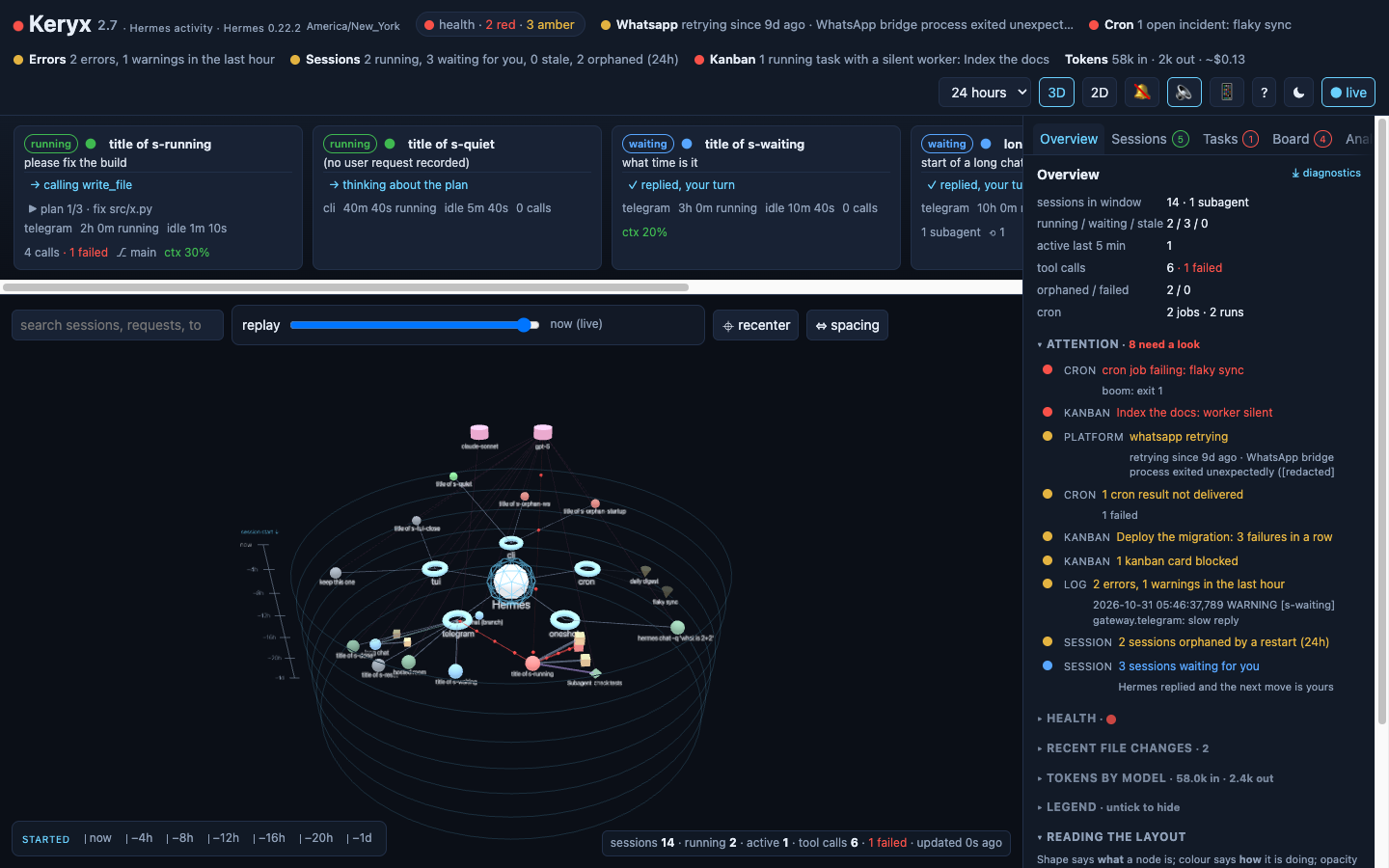
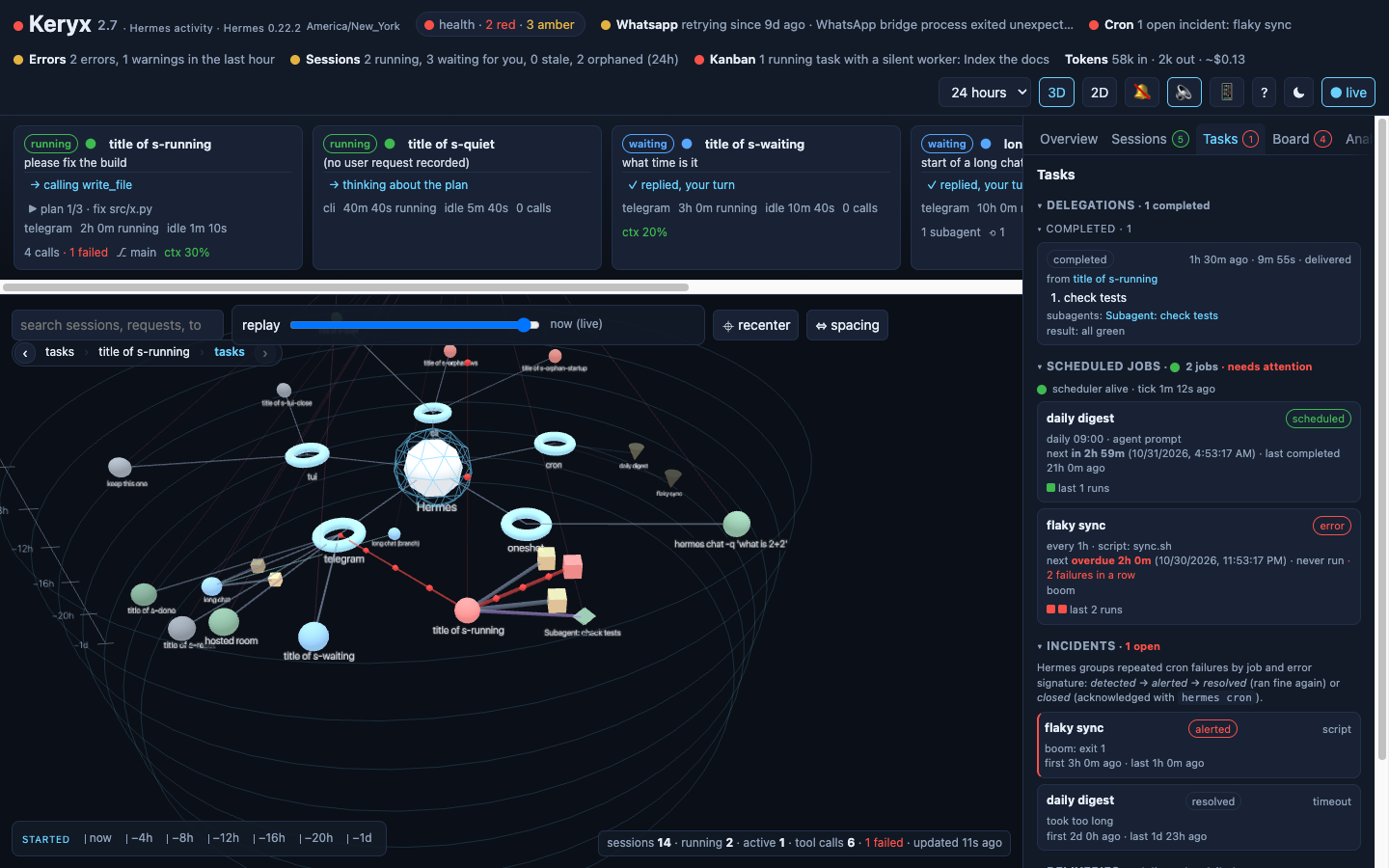
The Keryx dashboard: a health pill, a strip of running sessions, the 3D graph with Hermes at the centre and platforms, sessions, tools and cron jobs around it, and the overview panel with its attention list
A Hermes install with two live sessions, a compacted Telegram chat, a subagent, two cron jobs, a kanban board and one open incident (sample data). The attention list on the right says what needs a look.

Read-only, by construction

Keryx opens Hermes' files and never writes them. It never calls the agent or its API. Every number on the page comes from what Hermes itself recorded, read through snapshot copies that refresh when a file changes.

Live

One watcher follows the data files and pushes a server-sent event to every open page the moment something changes. Running sessions breathe; active links carry particles at the session's call rate.

Beside Hermes, not inside it

A small container (FastAPI + React) on port 9120 that mounts the Hermes data directory. Works with a native install or the official Hermes Docker image, on the same host. Nothing to install into Hermes.

One rule for the picture

Shape says what. Colour says how. Position says when.

Every node obeys the same three-part grammar, so once you have read one session you can read the whole graph at a glance.

Shape is the kind of thing

platform (ring) session (sphere) subagent (octahedron) tool call (cube) model (cylinder) cron job (cone)

Hermes is the faceted core at the centre. Tool cubes are sized by call count and turn red when a call failed; model cylinders are sized by tokens.

Colour is how a session is doing

running waiting for you stale ended closed by user orphaned failed

"Waiting for you" means the last message is Hermes' reply and the chat is open: the next move is yours. Failures come from the JSON result Hermes stores for each tool call, not from keyword matching. Anything touched in the last five minutes glows.

Position is when it started

Each platform (Telegram, TUI, CLI, cron…) owns a wedge around the hub and its sessions sit inside it, ordered by start time. In 3D the rings step downward from "now", in 2D they grow outward, and a clickable ruler along the bottom of the graph filters by when a session started. Opacity fades with age; labels scale with distance. Subagents orbit the session that spawned them; tools cluster around the session that called them; models sit on a shelf above; cron jobs fan out below.

Everything on the page

Features

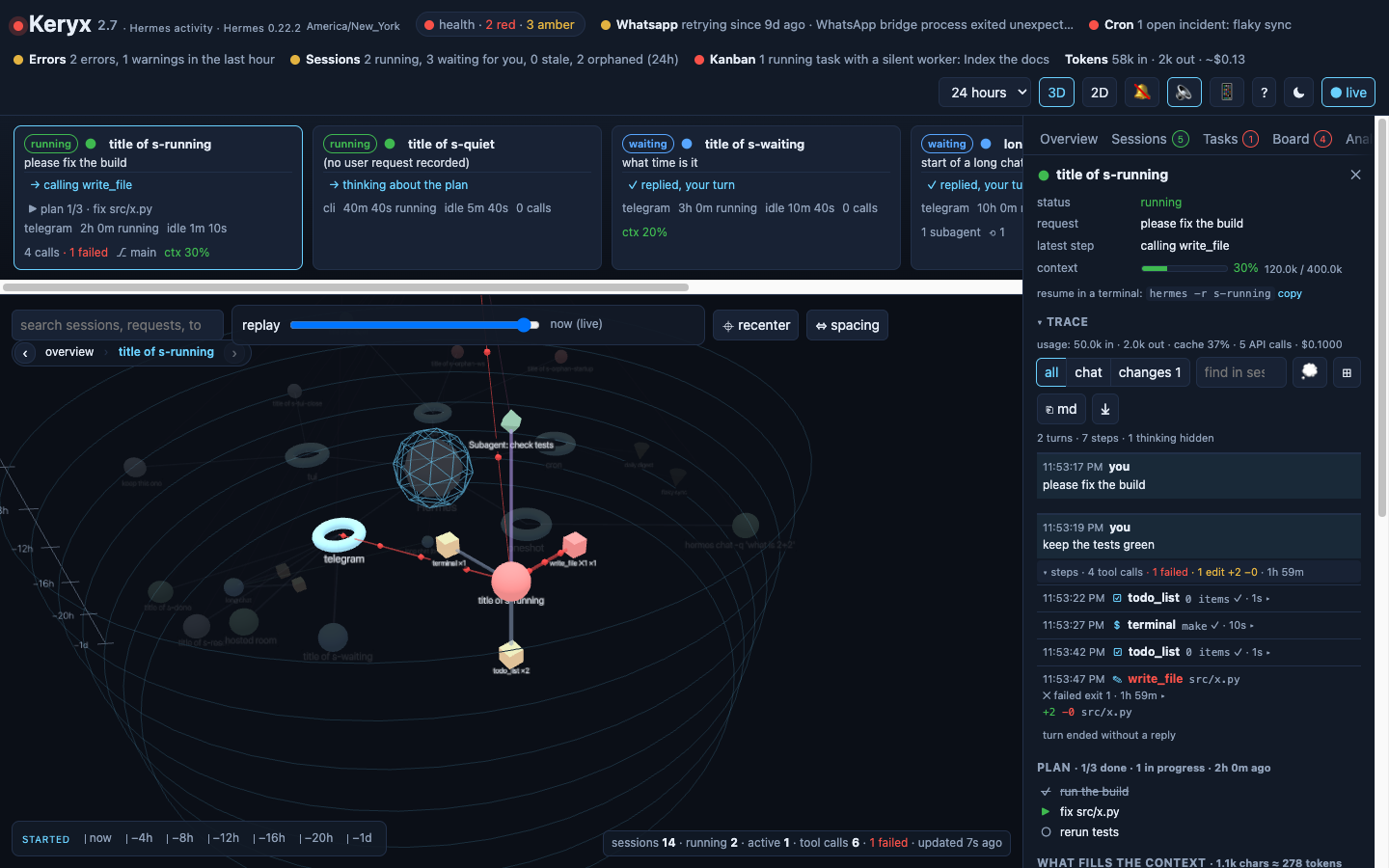
A session selected in Keryx: its tools fanned out in a ring, and the side panel showing status, request, latest step, the context gauge, the resume command and the turn-by-turn trace
A selected session: tools fan out in a ring facing you; the panel opens with four lines and the trace, then the plan, what fills the context and files touched.

Health header

  • The title dot shows the worst check; a health pill counts the red and amber ones and opens every check; only checks that are not green stay inline.
  • Gateway heartbeat and Hermes' own process state and version from gateway_state.json, one check per messaging platform as the gateway reports it (with the error it recorded when one is retrying), cron scheduler, the error log, session states, and the kanban board when it has tasks, each green / amber / red; the worst one drives the title dot.
  • The cron check reads Hermes' own incident ledger and delivery queue: an open incident is red, undelivered results are amber.
  • Token totals for the window with the spend, prefixed ~ when it is an estimate rather than a provider-reported figure.

Right now

  • One card per open session: the user's request, the latest step, elapsed and idle time, calls per minute, subagents, git branch.
  • Plan progress from the agent's own todo_list: done / total and the step in progress.
  • Context gauge: how full the model's window was at the last call.

The graph

  • 3D (default) or 2D, same layout and grammar.
  • Hover highlights a neighbourhood; click selects; sessions fan their tools out in a ring facing the camera.
  • Click a platform to collapse everything under it. Search dims what does not match. The legend has checkboxes to hide any kind or status.
  • Spacing scales rings, link lengths and repulsion together; recenter frames the whole graph again. Both remembered per browser.

Time

  • Window selector from the last hour to all time.
  • Replay: drag the bar to re-query the graph as of any moment in the window and watch sessions appear, run and end.
  • Click a label on the ruler under the graph to keep only the sessions that started in that span.
  • Times are shown in your browser's zone, named in the header; analytics days are counted in UTC.

Compacted conversations

  • When Hermes compacts a long chat it ends the session and continues in a child. Keryx folds that lineage into one node: it starts when the first segment started and is coloured by the latest one.
  • The trace shows every segment with a ⟲ marker where the context was compacted.
  • Branches you made with /branch stay separate, joined to their origin; delegated subagents keep their purple link.

Session detail

  • Opens with four lines, status, request, latest step and the context gauge, and the command that resumes the conversation in a terminal; the trace comes next.
  • Cost and usage (tokens in / out, cache reads and hit rate, reasoning tokens, API calls, the cost with its basis) and lineage and environment (platform, model, timings, working directory and branch, profile, parent, compactions, Hermes' own flags) sit in collapsed sections.
  • What fills the context: your messages, replies, tool-call arguments and tool output by tool, in characters, with the largest output.
  • The agent's plan as a checklist (done, in progress, pending, cancelled).
  • Files touched: writes, patches, reads and searches, most recent first, with lines added and removed.
  • The reading view: the conversation as turns (your question → a collapsible "steps · N" block → Hermes' reply), an outline of every question to jump to, an all / chat / changes filter, find in session, and copy or download as Markdown.
  • Every tool call with a kind glyph, a one-line title (the command, path, query or goal), duration, exit code, output size and +added −removed for file edits; Hermes' own events (model switch, steer, auto-continue, delegation results) in place.

Tasks tab

  • Delegations board: what Hermes asked subagents to do, grouped in progress / completed / failed, with goals, children, duration and delivery state.
  • Scheduled jobs with next run countdown, run history, missed slots, failure streaks and the scheduler heartbeat.
  • Incidents: Hermes groups repeated cron failures by job and error signature; Keryx shows their lifecycle (detected → alerted → resolved / closed).
  • Deliveries: cron results waiting to reach their chat, or that could not be delivered.

Sessions, analytics, logs

  • Sessions grouped by platform, by time (today / yesterday / this week / earlier) or by project; #tags in titles become filter chips; ☆ pins a session to the top; live ones always first.
  • The search box (⌘K) matches titles and digests, and from three characters also searches inside the conversations through Hermes' own full-text index, with snippets.
  • Analytics: daily trend of sessions, tool calls, failures, tokens and cost over 7 to 365 days; a year heatmap with streak; model share; Hermes' skill ledger (uses, views, last use).
  • Logs: filterable tails of every log file Hermes writes, by level and keyword. A line logged inside a session links to that session.

Attention and context

  • One ranked list of everything red or amber, from a failing cron job to a silent kanban worker or a pending gateway restart, each line leading to the node or the tab. The sessions waiting for you close the list.
  • The context gauge is sized from the window Hermes probed for the model (context_length_cache.yaml) or set in its config, and a breakdown under each session says what fills it: your messages, replies, tool-call arguments and tool output by tool.
  • Analytics gain insight sentences, sessions-per-day momentum, a cache-hit trend, provider mix, when Hermes works by hour of day and weekday, and achievement unlocks. Notifications can chime, synthesised in the browser, no audio files.

Kanban board, read-only

  • Hermes keeps a task queue in kanban.db: eight lanes from triage to done, workers that claim cards and heartbeat while they run. The board tab shows it in Hermes' own lane order, with a board switcher when there are several.
  • Click a card for its body, result, worker session, comments, run history and event timeline. A health check goes red when a running card's worker has gone silent.
  • Keryx never moves a card; that stays with hermes kanban and the dashboard.

The model's reasoning

  • Where the provider returns it, Hermes stores the reasoning beside each reply. The reading view keeps it hidden until you press 💭, then shows the head of each one as a muted block, searchable and exported with the Markdown.
  • Sessions pinned in Hermes show a ★; sessions Hermes hides from its own picker stay out of the list unless asked; its internal sessions (one-shot calls, tool helpers, kanban workers) sit in a collapsed group of their own.

Memory, opt-in

  • Hermes keeps two small files of notes between sessions: MEMORY.md (your environment and conventions) and USER.md (your preferences). A read-only tab shows them as entries with their character budgets, Hermes' on/off switches and anything Hermes blocked as prompt injection.
  • Personal data, so it stays off until you set KERYX_SHOW_MEMORY=1; the diagnostics download never includes it.

Notifications

  • In-app toasts, desktop notifications if you allow them, and optional short sounds.
  • Fires when Hermes replies and waits for you, a session fails or is orphaned by a restart, a session goes quiet, a delegation finishes or fails, a cron job fails or misses its trigger, or the error log turns red.
  • Click a toast to jump to the node.

Navigation

  • Every selection is a browser history entry that remembers the selection, the tab and the camera pose. Backspace goes back, Shift+Backspace forward; Alt+← and trackpad swipes work too. [ and ] change tab, ↑ ↓ walk the session list, ? in the header reopens the first-run card.
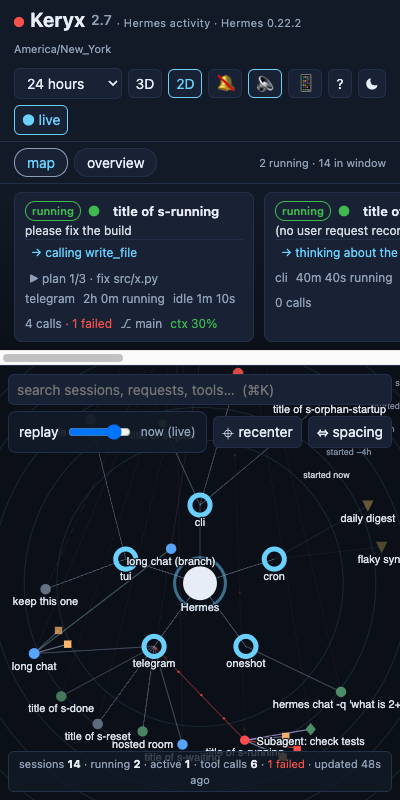
  • On a phone the graph and the panel take turns at full width behind a map / panel toggle; light and dark themes are both designed, not inverted.
  • The URL hash (#session:…, #cron:…) is a deep link you can share, or scan from the QR popover to open on your phone, where "add to home screen" keeps Keryx as an app.
  • Every icon button is labelled for screen readers; focus rings are visible; a first-run card explains the picture and ? brings it back.

Into the Hermes dashboard

  • Set HERMES_DASHBOARD_URL and every session, cron job and the logs tab gets an "open in the Hermes dashboard" link. Keryx never calls the dashboard; the links are for you.
  • A redacted diagnostics download (counts, states, ids, masked error lines, no message content) to attach to bug reports.
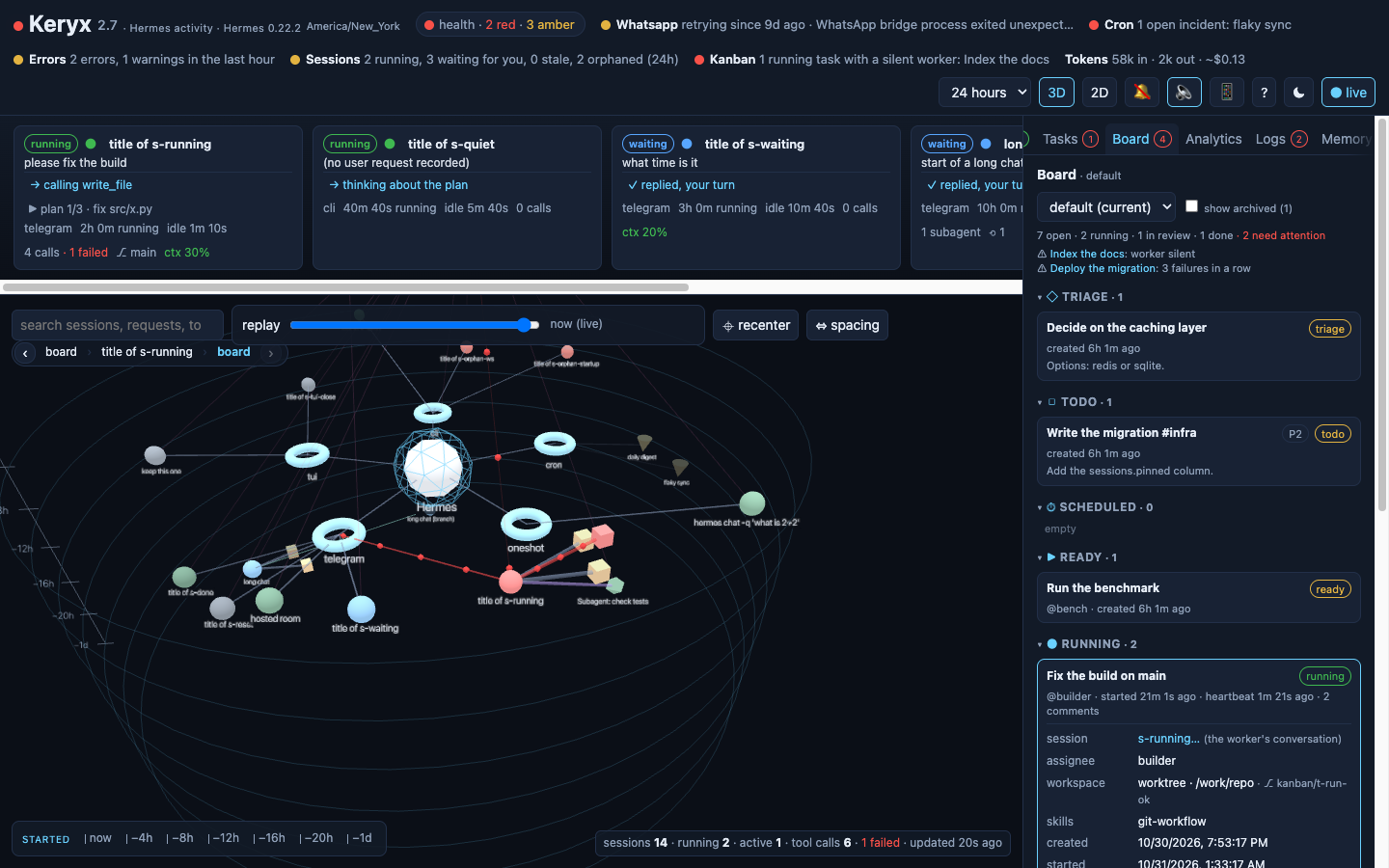
The board tab: Hermes' kanban lanes with a running card opened to its comments, run history and event timeline
Board: Hermes' kanban queue in its own lanes, read-only, with a card open.
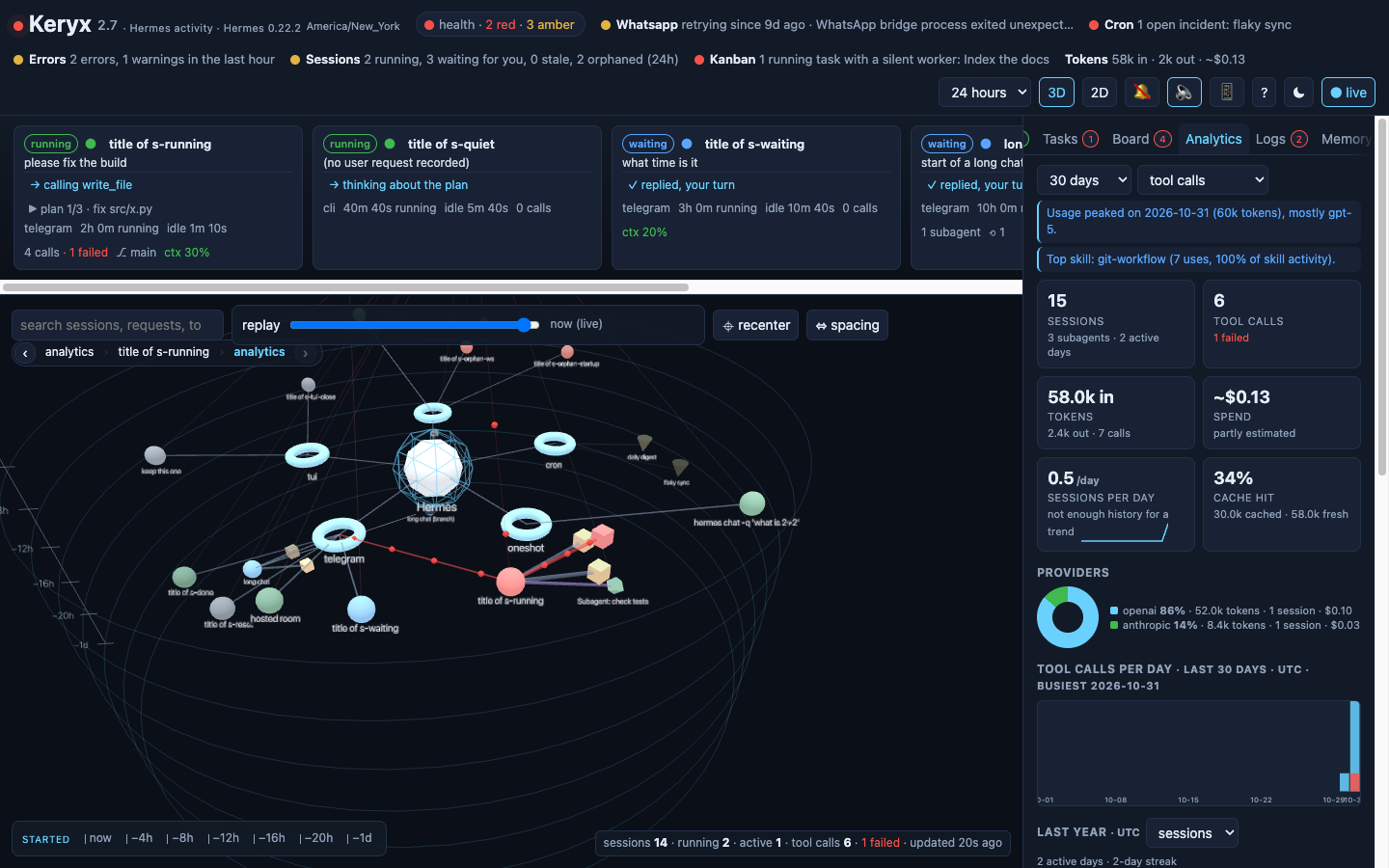
The analytics tab: insight sentences, session and token tiles, sessions-per-day momentum, cache hit, provider mix donut
Analytics: insights, momentum, cache trend, provider mix, when Hermes works.
The tasks tab: a completed delegation, two scheduled jobs with run history, an open incident and its lifecycle
Tasks: delegations, scheduled jobs, Hermes' incident ledger.
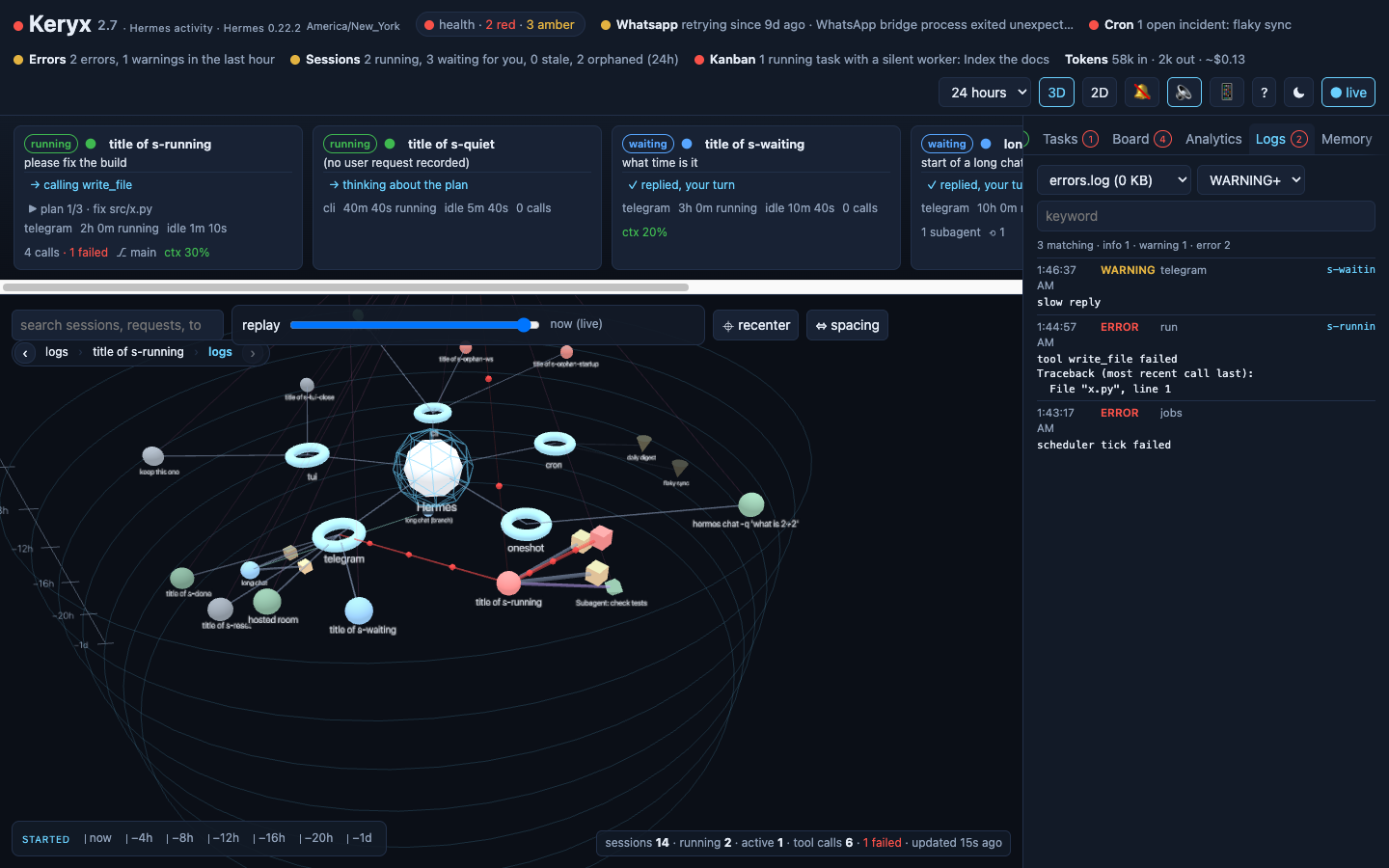
The logs tab: error-level lines from errors.log, one of them tagged with the session that logged it
Logs: every file Hermes writes, filtered by level; session-tagged lines link to their session.
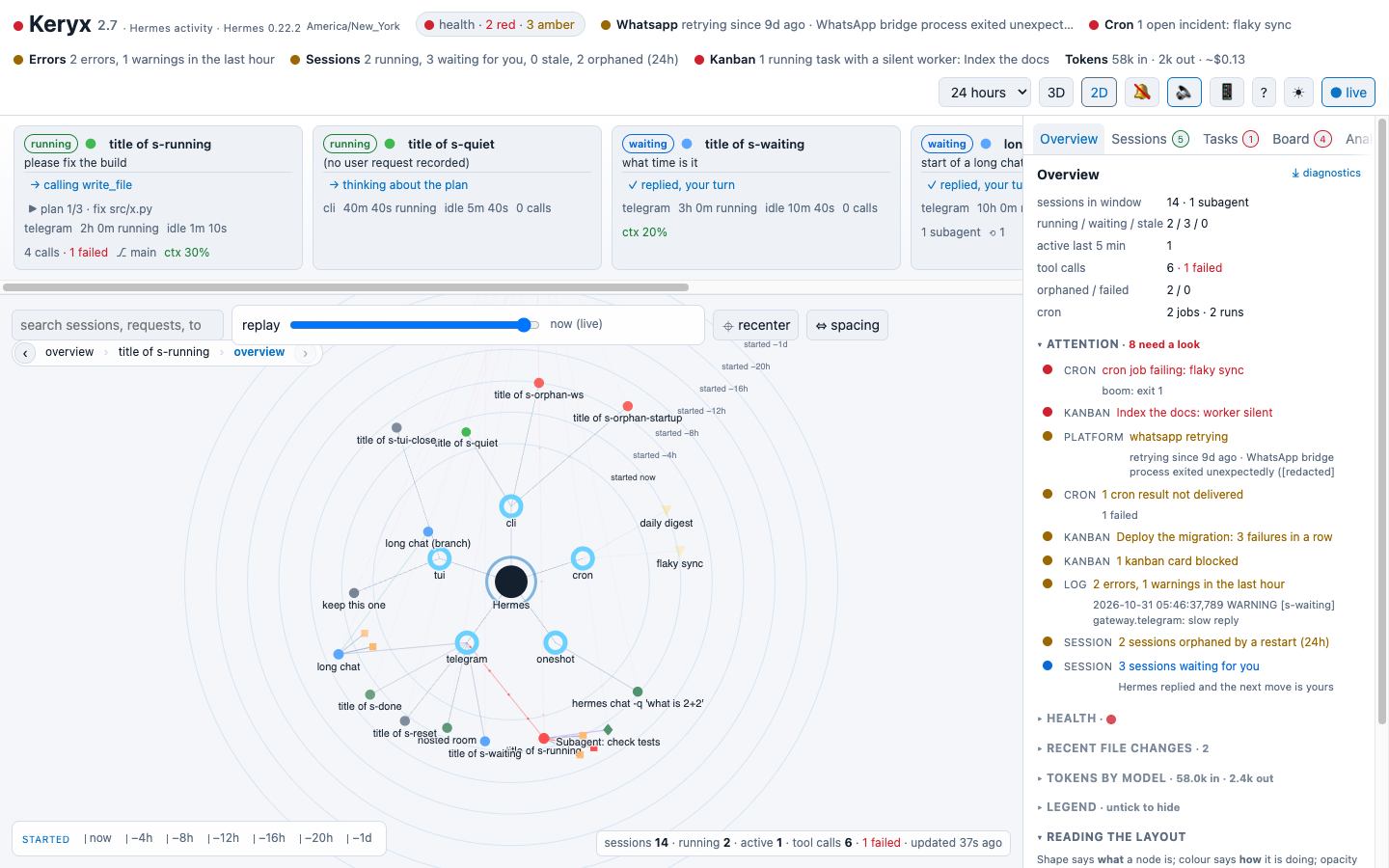
The light theme in 2D: the same graph with labels, rings and overlays in the light palette
The light theme, 2D view: every overlay and graph colour follows the theme.
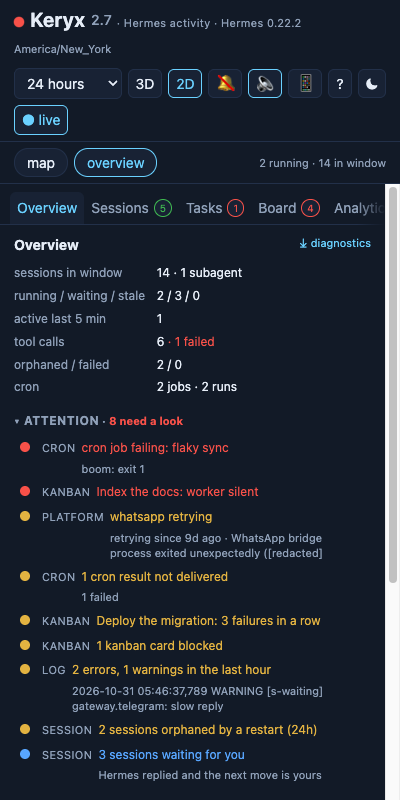
Keryx on a phone: the overview panel at full width with the attention list Keryx on a phone: the map view, with session cards above the 2D graph
On a phone the panel and the map take turns at full width.
Quick start

Running in two minutes

You need a Hermes Agent install whose data directory you can read, and Docker or Python 3.11+. Node is not required: a prebuilt image is published for every release.

Clone and run the quick-start script

git clone https://github.com/rafreid/keryx.git
cd keryx
./quickstart.sh

It finds the Hermes data directory (~/.hermes for a native install, /opt/hermes-data or /opt/data for the Docker install), works out which user owns it, pulls the image and starts Keryx with Docker Compose. Without Docker it falls back to a Python virtualenv. --build builds from source, --python skips Docker, HERMES_HOME=… points at another directory.

Open the page

Keryx listens on http://localhost:9120/. curl localhost:9120/api/health should answer with "state_db": true; if it is false, the data path is wrong or not readable by the Keryx user.

Optional: link it to the Hermes dashboard, lock it

# in docker-compose.yml, under the keryx service
- HERMES_DASHBOARD_URL=http://192.168.1.100:9119   # "open in the Hermes dashboard" links
- KERYX_TOKEN=change-me                            # one shared token for /api; the page asks once
Permissions. Hermes keeps its data directory mode 0700, so Keryx must run as the user that owns it. The quick-start script reads the owner from the directory; by hand, pass HERMES_UID and HERMES_GID to Compose ($(id -u) for a native install, 10000 for the official Hermes container unless you changed it).

Hermes in Docker already?

Paste the keryx service from the repository's docker-compose.yml into the compose file that runs Hermes, and mount the same host directory you give Hermes. The image is ghcr.io/rafreid/keryx:latest (amd64 and arm64).

Keep it private

Keryx shows everything Hermes recorded, including prompts and tool output. Bind the port to 127.0.0.1 and reach it over SSH or a VPN such as Tailscale, or set KERYX_TOKEN. Do not expose it to the internet. The only endpoint meant to be shared is the redacted diagnostics download.

Configuration

Environment variables

VariableDefaultMeaning
HERMES_DATA/opt/datathe Hermes data directory as seen by Keryx (the mount inside the container; HERMES_HOME is the host side for Compose)
GRAPH_PORT9120port to listen on
HERMES_DASHBOARD_URLunsetwhere the Hermes dashboard (port 9119) is reachable from your browser; adds links on sessions, cron jobs and logs
KERYX_TOKENunsetoptional shared secret; every /api route except /api/health then needs it as a bearer header, cookie or ?token=
KERYX_SHOW_MEMORYunset1 adds the read-only memory tab (Hermes' MEMORY.md and USER.md); off by default because these are personal notes
ACTIVE_WINDOW300seconds; a session touched this recently is "active" and its links carry particles
STALE_AFTER1800seconds; a session mid-turn but idle for this long is shown as stale
CONTEXT_LENGTH400000last-resort context window for the gauge; Keryx first uses model.context_length from Hermes' config, then the window Hermes probed into context_length_cache.yaml, then a built-in table

What Keryx reads

From the Hermes data directory, read-only: state.db and its WAL (including Hermes' full-text index), gateway_state.json, context_length_cache.yaml and the model section of config.yaml, kanban.db and kanban/boards/*/kanban.db, plugin-data/hermes-achievements/state.json, cron/jobs.json, cron/executions.db, cron/incidents.db, cron/deliveries.db, cron/ticker_heartbeat, logs/*.log, the skill ledger skills/.usage.json and, only when asked, memories/ and the memory section of config.yaml. Files an older Hermes does not write are skipped and columns are feature-detected, so Keryx keeps working across Hermes versions. The volume is mounted read-write only because SQLite in WAL mode needs to create its -shm file; Keryx itself never writes.

For scripts and integrations

HTTP API

Everything the page shows is available as JSON on the same port.

EndpointReturns
GET /api/graph?hours=24[&at=…]nodes and links; at replays the graph as of that moment; aliases maps compacted segment ids to their node
GET /api/nowrunning and waiting sessions digest
GET /api/statushealth checks (one per platform), the ranked attention list, dashboard links, and the gateway's state and Hermes version
GET /api/cost?hours=24tokens and cost per model with a cost_basis (actual, estimated, included, unknown)
GET /api/tasksdelegations, cron jobs with history and incidents, scheduler heartbeat, incidents, delivery queue, kanban counts
GET /api/kanban?board=…the kanban board as lanes; /api/kanban/{task_id} is one card with comments, runs and events
GET /api/analytics?days=30daily trend with cost, a year heatmap, model share, skill ledger, totals, provider mix, hour-of-day clock, velocity, insights, achievements
GET /api/search?q=…sessions whose conversation mentions the text, with snippets (Hermes' FTS5 index)
GET /api/memorymemory entries and budgets, only with KERYX_SHOW_MEMORY=1
GET /api/session/{id}/traceordered steps across every segment of a compacted conversation; tool calls carry kind, title, diff summary, exit code; thinking steps carry the model's reasoning
GET /api/session/{id}/todothe agent's current plan
GET /api/session/{id}/contextwhat fills the context: characters by part and by tool
GET /api/logs?file=…&level=…&q=…log entries with level, logger and session id
GET /api/diagnosticsredacted snapshot for bug reports
GET /api/stream?hours=24server-sent events, one update per data change
GET /api/healthliveness